Claude Code
Part 1: What It Is & Setup
The 81%, 5x, and 5.3x figures are one agency's (Digital Applied) self-reported results from its own client work, not independently verified and not a general benchmark. Your results will vary.
Why Non-Coders Should Use Claude Code
Despite its name, Claude Code isn't just for programmers. It works directly with your filesystem, remembers preferences across sessions, and can help you automate repetitive workflows.
Three Places It Can Run
The same agent runs in three execution environments; pick per task. Cloud sessions keep working after you close the app and count toward your subscription with no separate compute charge; Remote Control keeps execution local and moves only the interface to your browser or phone.
| Environment | Where it runs | Use for |
|---|---|---|
| Local (default) | Your machine | Everyday work: full access to your files, tools, and environment |
| Cloud | Anthropic-managed VMs | Long tasks that survive closing your laptop; repos you don't have locally; multiple repos per session |
| Remote Control | Your machine, driven from browser/phone | Monitor and steer a local session from another device; code never leaves your machine |
Getting Started Tutorial
Install and configure Claude Code in under 5 minutes
1Install Claude Code
Open your terminal (Terminal on Mac, PowerShell on Windows) and paste the command for your OS. It installs in seconds; the native installer auto-updates itself (Homebrew and WinGet installs do not).
Also available as a VS Code extension (search "Claude Code" in the Extensions panel), in JetBrains IDEs, the Claude Desktop app (macOS/Windows plus a Linux beta; the Code tab), on the web at claude.ai/code (research preview), and in Slack and CI/CD.
2Log In
Type claude in your terminal and hit Enter. It will open a browser window to log in. That's it. Credentials are saved for future sessions.
Claude Pro / Max
$20/mo or $100/mo. Log in with your claude.ai account. Easiest path. Pro defaults to Sonnet 5; Max defaults to Opus 4.8.
API Credits
Pay-per-use via console.anthropic.com. Good if you want granular cost control.
Teams / Enterprise
Shared billing, admin controls, and SSO. Cloud-provider auth is also supported: Amazon Bedrock, Google Cloud Agent Platform, and Microsoft Foundry.
3Start Your First Session
Navigate to any project folder and type claude. You'll see a welcome screen. Just start typing what you want. Plain English works.
Claude reads your files automatically, so you don't need to copy-paste code. It always asks permission before changing anything.
4Commands You'll Use Daily
5Tips for Non-Developers
Be specific
Instead of "fix the bug," say "the login page shows a blank screen after entering a wrong password. Fix it."
Ask before building
Start with "what does this project do?" or "explain how authentication works" before asking for changes.
Break it down
Instead of "build me an app," try step-by-step: "1. create a form, 2. add validation, 3. connect to the database."
Use /init
Running /init creates a CLAUDE.md with project context. This saves you from re-explaining your project every session.
Part 2: Interface & Control
Essential Slash Commands
Confirmed against current docs.
| Command | Purpose |
|---|---|
| /init | Create CLAUDE.md for project |
| /clear | Reset conversation. Use often |
| /compact [instructions] | Summarize to save tokens |
| /model | Switch between Claude models |
| /effort | Set reasoning effort (low, medium, high, xhigh, max, ultracode) |
| /goal | Set a completion condition Claude works toward across turns |
| /mcp | Manage MCP connections |
| /context | View context window usage |
| /cost | Show token statistics |
| /memory | Edit CLAUDE.md files |
| /rewind | Restore to previous checkpoint |
| /permissions | Manage tool allowlist and URL domains |
Keyboard Shortcuts
From the interactive-mode reference.
| Shortcut | Action |
|---|---|
| Alt+T | Toggle extended thinking mode (Option+T on Mac) |
| Shift+Tab | Cycle permission modes: Manual → Accept edits → Plan (+ any optional modes you enable) |
| Esc | Interrupt (preserves context) |
| Esc Esc | Rewind menu (empty input) / clear draft (with text) |
| Ctrl+V | Paste images directly (Alt+V on Windows/WSL) |
| ↑ / ↓ | Navigate prompt history (per project; Ctrl+R searches all projects) |
| \ + Enter | Multi-line input |
| Ctrl+B | Move the current task to the background |
| !command | Run shell command directly |
| Tab | Accept AI prompt suggestion |
Note: adding to CLAUDE.md memory is done with the /memory command (a "#" shortcut you may see in older guides is no longer current).
Permission Modes
Six documented modes control what Claude may do without asking: the five below plus a sixth, dontAsk (allow only pre-approved tools), set via --permission-mode or settings rather than the Shift+Tab cycle. Shift+Tab cycles the three base modes and grows to include optional ones you enable. Claude Code also sandboxes Bash commands at the OS level, a separate layer under all of these.
| Mode | Behavior |
|---|---|
| Manual (default) | Asks before edits and commands; shows the diff for accept/reject. Recommended starting point. |
| Accept edits | Auto-accepts file edits and common filesystem commands; still asks for other terminal commands. |
| Plan mode | Read-only. Claude explores and proposes a plan you approve before any edits. |
| Auto | Executes all actions with background safety-classifier checks. Needs recent models. |
| Bypass permissions | Skips nearly all prompts (the CLI's --dangerously-skip-permissions); org-set ask rules and a few safety circuit breakers still prompt. Sandbox/VM only. |
- Allowlist: Use
/permissionsto always allow specific tools (e.g.,Edit,Bash). - YOLO Mode:
--dangerously-skip-permissions(Use with caution, ideally in Docker).
Or run /permissions and add rules in its UI; there is no /permissions allow ... argument form.
Extended Thinking Mode
Enhanced reasoning for complex problems. Toggle with Alt+T (Option+T on Mac)
"think" < "think hard" < "think harder" < "ultrathink"
Create Custom Slash Commands
Place markdown files in .claude/commands/ for reusable workflows
Course Correction Tools
Redirect Claude mid-task without losing context
Tell Claude to plan before coding. Confirm before implementation starts.
Interrupt Claude during any phase. Context is preserved for redirection.
Jump back in history, edit a previous prompt, try a different direction.
Have Claude undo changes and take a different approach.
Interactive Mode Power Features
Quality-of-life features in the Claude Code terminal
| Feature | Shortcut | Description |
|---|---|---|
| Checkpointing | Esc + Esc or /rewind | Rewind code and conversation to previous states. Create restore points during long sessions. |
| Prompt Suggestions | Auto-appears | AI-powered next-step suggestions based on context. Hit Tab to accept. |
| Prompt History Search | Ctrl + R | Search through prompts across all project conversations. Repeatedly press Ctrl+R to cycle results. |
| Syntax Highlighting | Always on | Code diffs now have syntax highlighting for easier review in terminal. |
Data Input Methods
Four ways to get data into Claude for processing
How: Directly into prompt (most common)
Use for: Quick data snippets, error messages, short text
How: cat foo.txt | claude or cat logs.txt | claude -p "Analyze errors"
Use for: Logs, CSVs, large data files that would be tedious to paste
How: Ask Claude to use bash commands, MCP tools, or custom slash commands
Use for: Data from APIs, databases, or external services Claude can access
How: Mention file paths or paste URLs for Claude to read directly
Use for: Images, PDFs, documentation pages, design mocks
Part 3: Inner Workings
CLAUDE.md Configuration Files
Claude Code's memory, automatically loaded at session start.
| Location | Scope | Purpose |
|---|---|---|
| ~/.claude/CLAUDE.md | Global | Applies to all sessions |
| ./CLAUDE.md | Project | Shared with team via git |
| ./CLAUDE.local.md | Local | Gitignored, personal preferences |
| Child directories | On-demand | Loaded when working with those files |
Context Engineering
Managing the context window for maximum performance
Token Management
Agents consume tokens with every tool call and result. Context fills up fast.
Context Rot
Performance degrades as context fills. 'Lost in the middle' phenomenon.
System Reminders
Claude automatically injects reminders to maintain focus.
Pro Workflow
Recommended loop for complex features
1. Explore
Ask questions first. Use Explore agent to map the territory.
Sonnet 5 or Haiku 4.52. Plan
Design the approach. Use /plan or 'ultrathink' for architecture.
Opus 4.83. Execute
Implement in small steps. Micro-manage complex changes.
Sonnet 54. Review
Verify changes. Use a fresh context or separate model for review.
Opus 4.8 or GPT-5.6Sub-Agents & Task Delegation
Specialized agents for parallel workflows and specific tasks
| Agent | Role | Tools | Description |
|---|---|---|---|
| Explore Agent | Read-only File Search | Glob, Grep, Read, Bash (Read-only) | Navigate codebase without modifying it. Best for understanding existing logic. |
| Plan Agent | Software Architect | All Tools | Designs implementation plans, identifies critical files, considers trade-offs. |
| General-Purpose | Task Executor | All Tools | Handles complex multi-step tasks. Inherits full context. |
| Task Tool | Orchestrator | Spawns Sub-agents | Launch specialized agents for complex goals. Auto-delegates based on prompts. |
Skills & Plugins
On-demand loading saves tokens and enables powerful customization
What are Skills?
Skills load domain expertise on-demand. Like Neo downloading kung fu in The Matrix. They only consume tokens when needed.
What are Plugins?
Bundles of skills, commands, sub-agents, hooks, and MCP servers in a single distributable unit. Install with /plugin
Popular Plugin Example: frontend-design
Creates distinctive, production-grade interfaces. Avoids generic AI aesthetics by choosing bold design directions (brutalist, maximalist, retro-futuristic, etc.) and executing with precision.
Hooks: Event-Based Automation
Run bash scripts at specific points in the agent loop lifecycle
Examples: Play notification sound, run 'Do more' prompt to keep Claude working, log completion time
Examples: Inject reminders about skills, validate input format, add context automatically
Pro Tip: Combine hooks with skills to inject skill reminders automatically when user submits prompts. Reduces CLAUDE.md size while maintaining context.
MCP (Model Context Protocol) Servers
"USB-C for AI": Connect Claude Code directly to marketing platforms
| Server | Type | Capabilities |
|---|---|---|
| Google Ads | Official | Execute GAQL queries, campaign/keyword/ad performance, MCC account listing |
| Google Analytics 4 | Official (experimental) | GA4 reporting: standard, realtime, and funnel reports; account summaries; custom dimensions |
| Ahrefs | Third-party | Keyword research with volume/difficulty, competitor analysis, backlink profiles |
| Klaviyo | Third-party | get_campaigns, create_campaign, get_flow_report, email templates |
| GitHub | Official | PR/issue management, code review, repository operations |
| Search Console | Community | Clicks, impressions, CTR, average position data |
MCP Configuration Example
Add to .mcp.json (project-scoped) or ~/.claude.json (personal)
Headless Mode & Automation
Run Claude non-interactively for CI/CD and scripts (claude -p "prompt")
Issue Triage
Run on GitHub Actions to auto-label new issues or summarize bug reports.
Subjective Linter
"Review this PR for tone, variable naming clarity, and missing comments."
Fan-out Migration
Generate a list of 100 files, then script claude -p to migrate each one in parallel.
Pipelining
cat logs.txt | claude -p "Find errors" --output-format json | process_errors.py
Safe YOLO mode: Use --dangerously-skip-permissions in a Docker container without internet access. See reference implementation.
Multi-Claude Workflows
Scale your intelligence by running parallel instances
1. Claude A writes code.
2. Claude B reviews code.
3. Claude A fixes code.
(Prevents tunnel vision)
Open multiple terminals with different git worktrees to work on Feature A and Feature B simultaneously without conflict.
One Claude instance for "Planning/Architecture" (Opus), another for "Coding/Implementation" (Sonnet).
Hidden Power User Features
Experimental commands and environment variables (use with caution).
- !command - Run a shell command directly from the Claude Code prompt
- /clear - Clear conversation context and start fresh
- /compact - Condense conversation to reduce token usage
- /cost - Display token usage and estimated cost for the session
- /help - Show available slash commands and usage info
- DISABLE_AUTOUPDATER=1 - Disable automatic updates
- ANTHROPIC_MODEL - Override the default model for a session
- CLAUDE_CODE_DISABLE_AUTO_MEMORY=1 - Disable automatic memory loading
- CLAUDE_CODE_DISABLE_FILE_CHECKPOINTING=1 - Disable file checkpointing (/rewind then restores conversation only)
- .claude/settings.json - Project settings: permissions, hooks, env vars
- .mcp.json in project root - Shared MCP server config, committed for the whole team
Part 4: Workflows, Marketing & ROI
Core Development Loops
Proven patterns for effective agentic coding
AExplore, Plan, Code, Commit
Versatile workflow for most features. Prevents "jumping to code" too early.
BTDD Loop (Test-Driven)
Anthropic-favorite for robust code. Claude excels when given a clear failing target.
Codebase Q&A (Onboarding)
Treat Claude as a pair programmer who knows the whole repo.
- "How does the logging system work?"
- "Where is the API endpoint for user creation?"
- "Why are we using `useEffect` here?"
- "What changes made it into v1.2.3?" (Git history search)
Git and GitHub Integration
Claude can handle most routine git operations. Install the gh CLI for full GitHub access.
| Smart Commit | "Commit these changes" (Generates context-aware message) |
| History Search | "Who changed this file last week and why?" |
| Create PRs | "Create a PR" (understands "pr" shorthand) |
| Fix Review Comments | "Fix the comments on my PR and push" |
| Fix Failing Builds | "Fix the failing CI checks" |
| Triage Issues | "Loop over open issues and categorize by priority" |
Workflow Optimization Tips
"Implement this design." → Copy/Paste screenshot of result → "Fix padding."
(Use Puppeteer MCP or manual screenshots)
For migrations: "1. List all errors in file. 2. Fix one by one. 3. Verify each."
Bad: "Fix it."
Good: "Look at `foo.py` history to understand why the API is weird, then fix the type error."
Prompt Specificity Examples
Specific instructions dramatically improve first-attempt success
| Poor Prompt | Better Prompt |
|---|---|
| add tests for foo.py | Write a new test case for foo.py covering the edge case where the user is logged out. Avoid mocks. |
| why does ExecutionFactory have such a weird api? | Look through ExecutionFactory's git history and summarize how its API came to be. |
| add a calendar widget | Look at how existing widgets are implemented on the home page to understand patterns. HotDogWidget.php is a good example. Then implement a calendar widget with month selection and year pagination. |
Use Cases Beyond Code
Know before you script: these task categories are also exactly what Claude Cowork (module 11) was built for: the same engine with a no-terminal desktop surface. If you want scripts, git history, and hooks wrapped around these jobs, stay here. If you or a teammate just wants the finished deliverable, Cowork is the shorter path.
File Management & Organization
Tame digital chaos by renaming, sorting, and organizing files with natural language commands.
- Rename invoices to YYYY-MM-DD Vendor - Invoice - Product.pdf format
- Organize 5 years of project folders with searchable indexes
- Transform messy Obsidian vaults into structured knowledge bases
- Sort photos by EXIF date into year/month folders
Writing & Content Creation
Native skills for creating Word docs, PowerPoints, Excel spreadsheets, and PDFs.
- End-to-end content creation from idea to publication
- Technical writing with Hugo integration
- Presentation slides with multi-AI feedback via MCP
- Documentation management with CLAUDE.md context
Research & Information Synthesis
Custom slash commands unlock powerful research workflows across platforms.
- /youtube @channel for full channel analysis
- Competitor analysis with pricing page summaries
- Literature reviews and hypothesis generation
- YouTube transcript analysis with note-taking MCPs
Personal Assistant & Automation
Transform Claude Code into a persistent personal assistant that maintains context.
- Daily briefings with personalized priority summaries
- Automated journaling with /daily-journal command
- Weekly dashboards monitoring personal and career metrics
- Disk space cleanup, screenshot enhancement, raffle picking
Jupyter Notebooks & Data Science
Read and write Jupyter notebooks with Claude interpreting outputs including images.
- Open .ipynb file side-by-side with Claude Code in VS Code
- Explore and interact with data through notebook cells
- Clean up notebooks before sharing with colleagues
- Make data visualizations aesthetically pleasing
Business & Productivity Workflows
SEO & Content Strategy
Connect Ahrefs, GA4, and Search Console MCPs to find high-converting pages and identify new content pillars.
Lead Generation
"Look at what I'm building and identify the top 5 companies in my area that would be good for a pilot."
Meeting Analysis
Download recordings, ask Claude to identify patterns like "all the times I subtly avoided conflict."
Product Management
Write PRDs using Obsidian, Notion, and Linear MCPs. Auto-generate wikis and issues from descriptions.
Cost Optimization Strategies
Average costs run ~$13/developer/active day, 90% under $30/day
| Model | Best For | Cost |
|---|---|---|
| Opus 4.8 | High-level planning, architecture, final review | $$$$ |
| Sonnet 5 | Routine implementation, standard tasks | $$ |
| Haiku 4.5 | Quick status checks, data parsing | $ |
Switch models dynamically with /model. Monitor with /cost or npx ccusage.
Common Mistakes to Avoid
Self-Reported Marketing ROI
One agency's (Digital Applied) self-reported figures from its own client work. These are not independently verified, and not a general benchmark. Your results will vary.
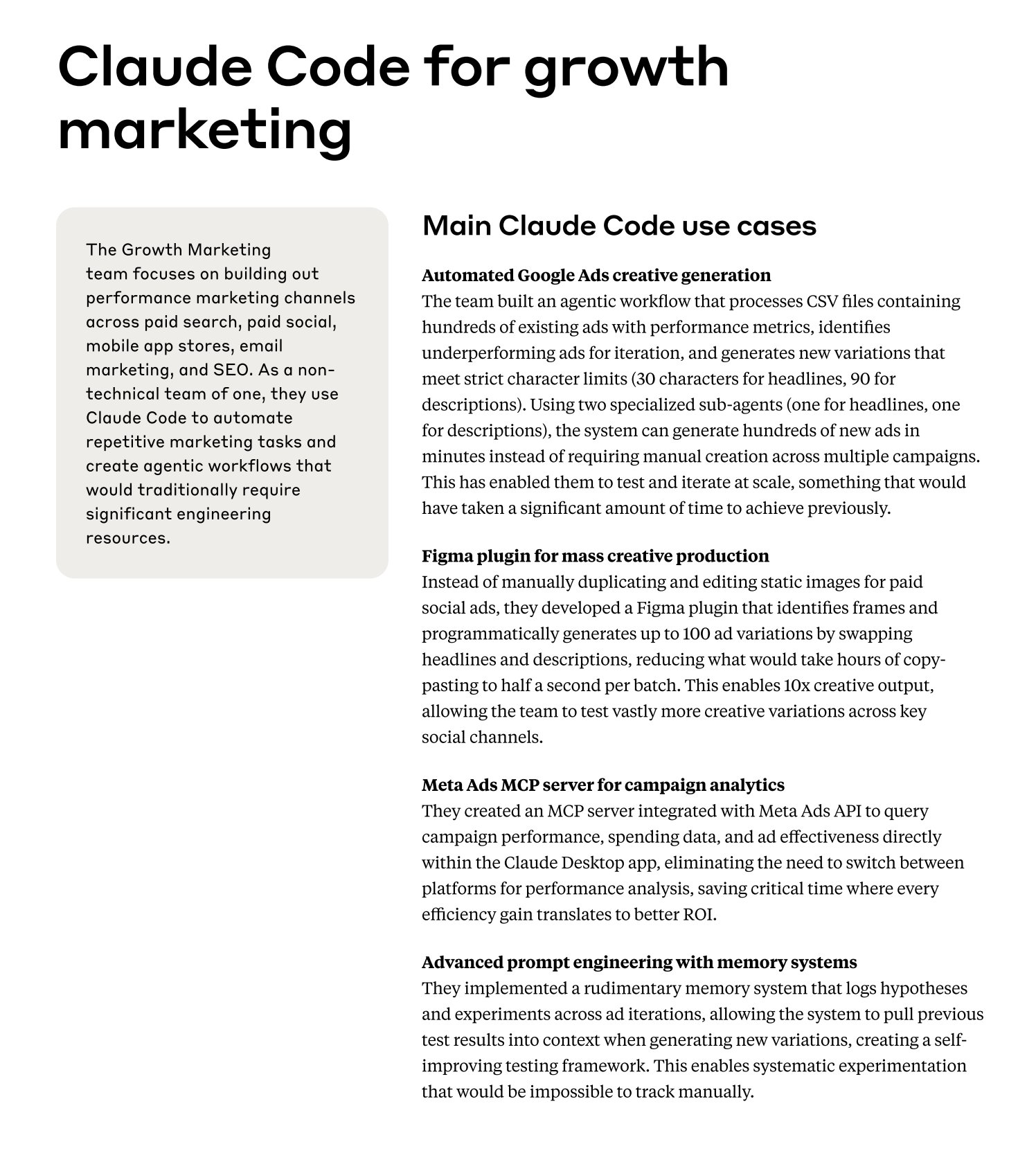
PPC Workflow Automation
An illustrative two-sub-agent pattern for ad copy
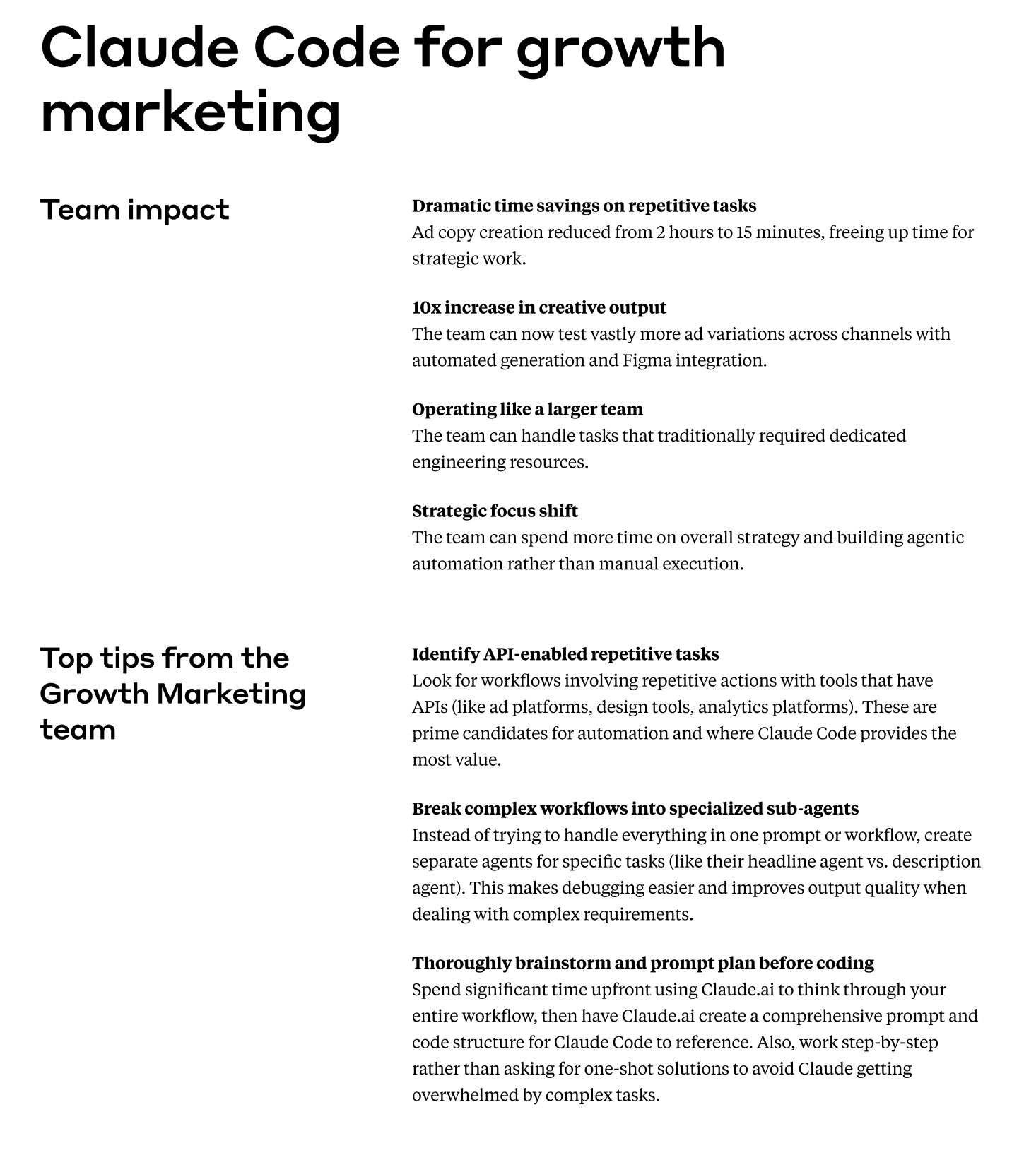
Key insight: Use two specialized sub-agents (headlines + descriptions) rather than one monolithic prompt. Illustrative result: ad copy creation can drop from roughly 2 hours to 15 minutes, with many more variations tested per month.
RSA Generation Prompt Pattern
SEO Automation Workflows
Bulk Meta Generation
Process 500+ URLs, generate optimized titles (60 chars) and descriptions (155 chars) with primary keywords.
Schema Markup at Scale
Generate valid JSON-LD FAQ and Product schema ready for HTML insertion.
Keyword Cannibalization
Cluster by semantic similarity, identify cannibalization, recommend primary URLs.
Internal Linking Plans
Analyze content, identify linking opportunities, suggest anchor text variations.
Shopify Integration
Multi-agent workflow with n8n:
- 1.Orchestrator Agent manages workflow
- 2.Product Description Agent (Sonnet) for SEO
- 3.Meta Fields Agent for structured data
- 4.SEO Fields Agent optimizes descriptions
Klaviyo Automation
With Klaviyo MCP configured:
- Analyze 30-day campaign performance
- Identify top-performing subject lines
- Draft subject line variations (urgency, curiosity, personalization)
- Generate SMS variants under 160 chars
Scheduled Automation Patterns
Content Production Workflows
End-to-end automation for high-volume content generation
Ad Copy A/B Test Variants
Generate multiple headline and description variants for RSAs
Blog Content Briefs with SEO
Turn keywords into detailed content briefs with optimal structure
Product Description Generation
Create SEO-optimized, brand-consistent product copy at scale
YouTube Ad Script Generation
Create video ad scripts with hook/body/CTA structure