GrowthVector MCP
Connect Claude, Codex, or Cursor to GrowthVector. Your AI agent can search GrowthVector's guides, glossary, and prompts. With Pro, it can also run SEO audits and Data Extraction.
Free or Pro
Two servers, one set of knowledge tools
The Free server needs no account. The Pro server adds the SEO audit and Data Extraction tools.
| Feature | Free | Pro |
|---|---|---|
| Server URL | https://growthvector.io/mcp | https://growthvector.io/mcp-pro |
| Knowledge tools | Yes | Yes |
| Calls | 5 calls per minute and 50 calls per day for each IP address or verified free account | 60 calls per minute and no daily limit for each Pro account |
| SEO audits | No | 20 SEO audits per day |
| Data Extraction | No | 10 extractions per day, shared with the website tool |
| Account | None needed | GrowthVector Pro |
Install the Free server
Claude Code
claude mcp add --transport http --scope user growthvector https://growthvector.io/mcpCheck it with claude mcp list. --scope user makes the server available in every project.
Claude app (claude.ai, Desktop, and mobile)
- Open Customize, then Connectors.
- Click Add, then Add custom connector.
- Enter a name and
https://growthvector.io/mcpas the server URL, then click Continue, then Add. - In a chat, click
+, choose Connectors, and turn GrowthVector on.
The Free Claude plan allows 1 custom connector in total.
On Team and Enterprise plans, only an organization Owner can add a custom connector. The Owner opens Organization settings, then Connectors, clicks Add, then Custom, and chooses Web. Each member then opens Customize, then Connectors, and clicks Connect.
Codex
codex mcp add growthvector --url https://growthvector.io/mcpOr add this block to ~/.codex/config.toml:
[mcp_servers.growthvector]
url = "https://growthvector.io/mcp"
Cursor and other clients
Save this as ~/.cursor/mcp.json for every project, or as .cursor/mcp.json for one project.
{
  "mcpServers": {
    "growthvector": {
      "url": "https://growthvector.io/mcp"
    }
  }
}
Any other client that accepts a remote MCP server by URL can use https://growthvector.io/mcp.
Install the Pro server
Connect with an MCP key
- Open your Account page, find MCP keys, and create a key. Only Pro accounts can create a key. GrowthVector shows the key once, so copy it then.
- Save the key in an environment variable named
GROWTHVECTOR_KEY.
# macOS and Linux
export GROWTHVECTOR_KEY="paste-your-key-here"

# Windows PowerShell
$env:GROWTHVECTOR_KEY = "paste-your-key-here"
Claude Code
claude mcp add --transport http --scope user growthvector-pro https://growthvector.io/mcp-pro --header "Authorization: Bearer $GROWTHVECTOR_KEY"Your shell fills in the key when you run this command, and Claude Code stores it. In PowerShell, write $env:GROWTHVECTOR_KEY in place of $GROWTHVECTOR_KEY.
Codex
Add this to ~/.codex/config.toml:
[mcp_servers.growthvector-pro]
url = "https://growthvector.io/mcp-pro"
bearer_token_env_var = "GROWTHVECTOR_KEY"
Codex reads the variable when it runs, so start Codex from a shell where GROWTHVECTOR_KEY is set.
Cursor
This file has both servers. Set GROWTHVECTOR_KEY where Cursor can read it, then restart Cursor.
{
  "mcpServers": {
    "growthvector": {
      "url": "https://growthvector.io/mcp"
    },
    "growthvector-pro": {
      "url": "https://growthvector.io/mcp-pro",
      "headers": {
        "Authorization": "Bearer ${env:GROWTHVECTOR_KEY}"
      }
    }
  }
}
Connect with your GrowthVector login
No key needed. You sign in with your normal GrowthVector login.
Claude app (claude.ai, Desktop, and mobile)
- Open Customize, then Connectors.
- Click Add, then Add custom connector.
- Enter a name and
https://growthvector.io/mcp-proas the server URL, then click Continue. - Keep the settings Claude detects (Sign in now, and Claude's published identity), then click Add.
- Click Connect, sign in to GrowthVector in the window that opens, and click Allow on the GrowthVector consent page.

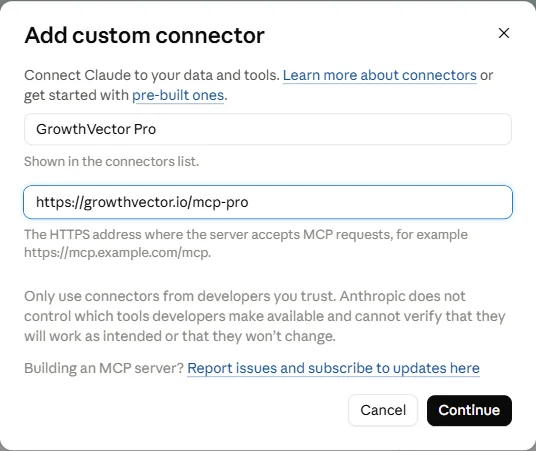
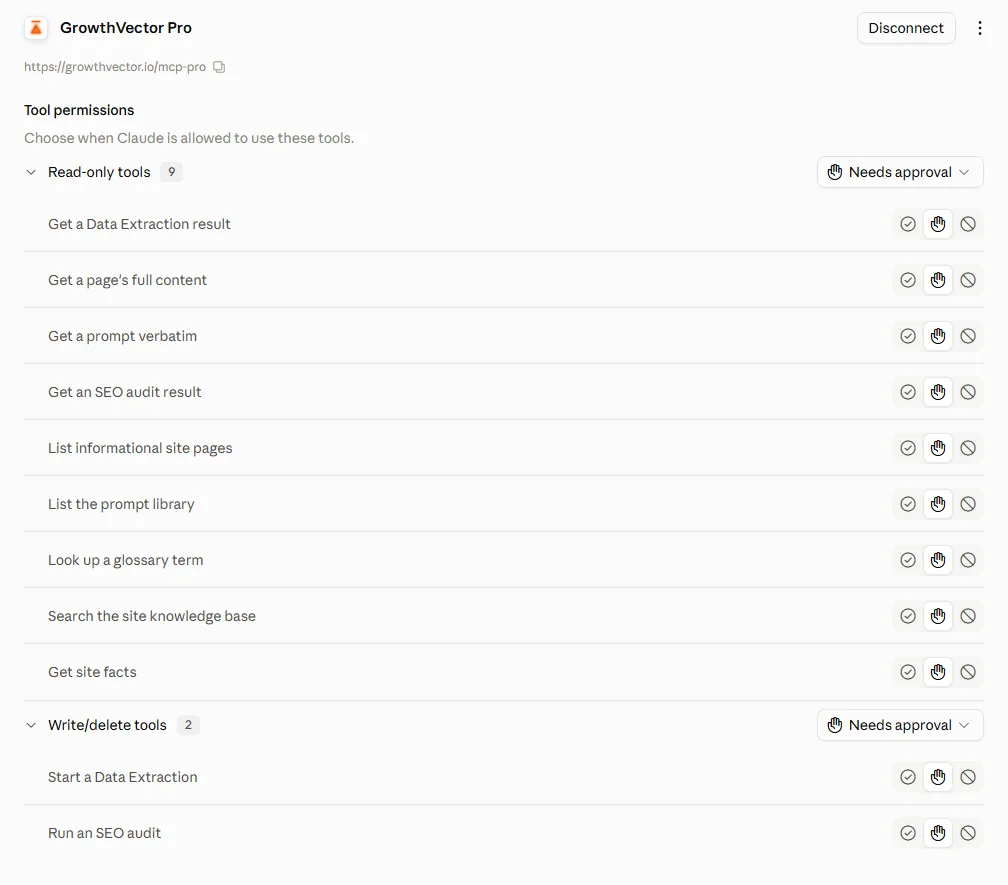
The Free Claude plan allows 1 custom connector. Pick the Free server or the Pro server.
Claude Code without a key
claude mcp add --transport http --scope user growthvector-pro https://growthvector.io/mcp-pro
claude mcp login growthvector-pro
Click Allow on the GrowthVector page that opens. You can also run /mcp inside a Claude Code session to start the sign-in.
Tools
Knowledge tools (Free and Pro)
Both servers offer these 7 tools.
| Tool | What it does | Main inputs | Example request |
|---|---|---|---|
| gv_search_site | Searches GrowthVector guides, glossary, prompt library, and reference documents. Returns the full text of each match with its page URL. Short quotes only for 1 copyrighted book. | query, limit (1 to 10, default 5) | Search GrowthVector for how to write negative keywords for Google Ads. |
| gv_get_page | Returns one full GrowthVector page with its headings. | route, part | Read /seo/fundamentals on GrowthVector in full. |
| gv_list_pages | Lists every guide page with its title, description, and section. | section (optional) | List every GrowthVector page in the seo section. |
| gv_lookup_term | Returns the definition of a marketing term from the GrowthVector glossary. | term | What does cost per click mean in the GrowthVector glossary? |
| gv_list_prompts | Lists every prompt in the Prompt Library with its id, category, and title. | category (optional) | List the GrowthVector prompts for email marketing. |
| gv_get_prompt | Returns one Prompt Library prompt exactly as written. | id | Get the GrowthVector prompt with this id and fill it in for my business. |
| gv_site_facts | Returns current plan names, prices, tool limits, and contact details. | none | What does GrowthVector Pro include today? |
SEO audit and Data Extraction tools (Pro only)
The Pro server adds these 4 tools.
| Tool | What it does | Main inputs | Example request |
|---|---|---|---|
| gv_run_seo_auditPro | Starts a technical SEO audit of a site and returns a crawlId at once. | url, maxPages (1 to 250, default 250) | Run a GrowthVector SEO audit on [your site URL]. |
| gv_get_seo_auditPro | Returns the status of an audit. When it is done, returns the full report in parts. | crawlId, part | Get the result of that audit and read every part. |
| gv_extract_dataPro | Starts a Data Extraction on a public website (entities, contacts, structured data, and page text from up to 250 pages) and returns an extractionId at once. Uses 1 of your 10 daily extractions. A failed job is not counted. | url, maxPages (1 to 250), include (sections) | Extract the contacts and structured data from [your site URL]. |
| gv_get_extractionPro | Returns the status of an extraction: running, failed with the reason, or complete with the full result in parts. Results are kept for 7 days. | extractionId, part | Get that extraction and read every part. |
Long results
A page, audit, or extraction longer than 40,000 characters comes in numbered parts. Each part tells your agent its number, the total, and the next part. The agent reads every part, so nothing is left out.
An audit or an extraction can take several minutes. The start tool returns at once with an ID, and your agent asks for the result with the get tool until it is complete.
Text inside audit and extraction results comes from the site you scanned. Your agent should treat it as data, never as instructions.
Prompts to try
Plan the GEO work for my site
Uses GrowthVector's guides to build a step-by-step AI search plan.
Use the GrowthVector MCP tools. Search GrowthVector for generative engine optimization (GEO) guidance, read the full pages you find, and build a step-by-step GEO plan for my site: [your site URL]. Cite the GrowthVector page URL for each step.Audit my site and explain the top 5 fixes
Pro: runs an SEO audit, then explains the fixes with GrowthVector's guides.
Use the GrowthVector Pro MCP. Run gv_run_seo_audit on [your site URL]. Poll gv_get_seo_audit until it is complete and read every part. Then list the 5 fixes with the biggest impact. For each fix, search GrowthVector for the matching guide and explain how to do it, with the page URL.Explain a marketing term in context
Uses the GrowthVector glossary and guides.
Use the GrowthVector MCP tools. Look up [term] in the GrowthVector glossary, then search GrowthVector for a guide that uses it. Explain the term in plain words and give 1 example for a small business.Find the right GrowthVector prompt
Lists the GrowthVector prompt library and picks a prompt for your task.
Use the GrowthVector MCP tools. List the GrowthVector prompt library, pick the best prompt for this task: [your task], get it with gv_get_prompt, and fill it in for me.Limits and messages
Call limits
Your identity sets your limit. The same account gets the same knowledge limits on both servers.
| Who | Per minute | Per day |
|---|---|---|
| Anyone with no account, or a signed-in account with an unverified email, per IP address | 5 calls per minute | 50 calls per day |
| Claude app with no sign-in, or a signed-in account with an unverified email (1 allowance shared by all its users) | 20 calls per minute | 1,000 calls per day |
| Free GrowthVector account with a verified email, per account | 5 calls per minute | 50 calls per day |
| GrowthVector Pro account, per account | 60 calls per minute | No daily limit |
Pro tools have their own daily limits: 20 SEO audits per day and 10 extractions per day. The 10 extractions are shared with the website Data Extraction tool.
Every tool call counts toward the per-minute and the daily limit. Connecting and listing tools count toward the per-minute limit only.
All anonymous users, and all accounts with an unverified email, share 2,000 searches per day with gv_search_site. The other knowledge tools do not use that pool.
The Claude app shares 1 free allowance between all its users. When it runs out, Claude asks you to sign in to GrowthVector for your own allowance.
What each message means
| Message | What it means |
|---|---|
| You reached the GrowthVector MCP limit of N calls per day. It resets in about X. | You used the daily allowance for your identity. Wait for the reset time in the message, sign in with a free GrowthVector account for your own allowance, or get Pro. |
| Too many GrowthVector MCP calls in 1 minute (limit N). | You went over the per-minute limit. Wait the time in the message and try again. |
| GrowthVector's free search is busy for today. | All anonymous users, and all accounts with an unverified email, together used the 2,000 daily searches. The page, glossary, and prompt tools still work. Search resets in about the time the message gives. |
| This tool needs GrowthVector Pro. | You are connected, but your account does not have Pro. The knowledge tools keep working. Upgrade on the Pricing page to use the Pro tools. |
| Verify your email to get your account's own limit. | GrowthVector adds this to a daily or search limit message when a signed-in account (Free or Pro) has an unverified email. Until you verify the email, the account gets the shared limits for people with no account: the per-IP limit, or the Claude app allowance. Verify your email address and your account gets its own allowance. |
| Daily SEO audit limit reached (20 per day). | You started 20 SEO audits on your Pro account within the last 24 hours. Start the next audit after the oldest one is more than 24 hours old. |
| Daily limit reached (10 per day). | You used your 10 daily extractions. Extractions started on the website and through MCP share this allowance. Start the next one after the oldest is more than 24 hours old. |
| Authentication required. | The Pro server did not get a valid key or sign-in. Check the key under MCP keys, or sign in again. |
| Service temporarily unavailable. | GrowthVector could not check your sign-in or your limits. Try again in a minute. |
| The extraction did not finish. Start it again. | The extraction stopped before it could report a result. It was not counted. Start it again. |
Troubleshooting
A tool is not listed
/mcp lists the 7 knowledge tools. The 4 Pro tools appear only on the Pro server at /mcp-pro. Restart your client after you add a server. In Claude Code, run claude mcp list and look for Connected. In the Claude app, open the + menu in a chat, choose Connectors, and check that the GrowthVector toggle is on.I reached a limit
The message tells me to verify my email
I see "This tool needs GrowthVector Pro"
My key stopped working
GROWTHVECTOR_KEY again. If your Pro plan ended, the key still works for the knowledge tools under the free account limits, and the Pro tools return the Pro message.An extraction says it did not finish
How do I disconnect Claude from my account?
Privacy
What GrowthVector keeps
Your call limits use your account ID, or a keyed hash of your IP address. They do not use the IP address itself.
Standard server request logs hold the request path, the time, and your IP address, as for every page on this site. They never hold your keys, your tokens, or the output of a tool. If a tool call fails, the server log holds the tool name and the error.
The search cache holds a hash of your search and its numeric embedding, not your words. It expires after 30 days.
To search, GrowthVector may send your search text to OpenRouter or another embedding provider, unless the same search is already in the cache. GrowthVector keeps only the hash and the numbers, not the text.
SEO audit reports stay with your account. After 7 days, extraction results can no longer be read. GrowthVector deletes expired results the next time anyone starts an extraction through MCP. Deleting your account deletes your extraction results.